1
1 2
2 3
3 4
4
Microsoft has officially revealed the next Windows OS, the all new Windows 10.
While everyone was expecting a Windows 9, Microsoft jumped straight to Windows 10. The project 'Threshold', and the 'Windows 9' leaks that surfaced around a bit earlier, are actually Windows 10, as revealed today, and there will be no Windows 9 at all.
Microsoft is calling Windows 10 the 'best Windows yet', and will be integrating extreme feedback this time around, all the way up to the release.

The Windows 10 reveal shows a new start menu, which is basically a merging of both Windows 7 and Windows 8 start menus. While having a Windows 7-like start menu on the left side, the right side consists of Live Tiles from Windows 8, basically giving both the users who want the old start menu back, and those who liked the live tiles what they like into one thing.

The start-menu search also has a Windows 8 twist to it, as it will not only bring up things from your PC, but also the internet. It will also be in the task-bar as well, not only the start menu.
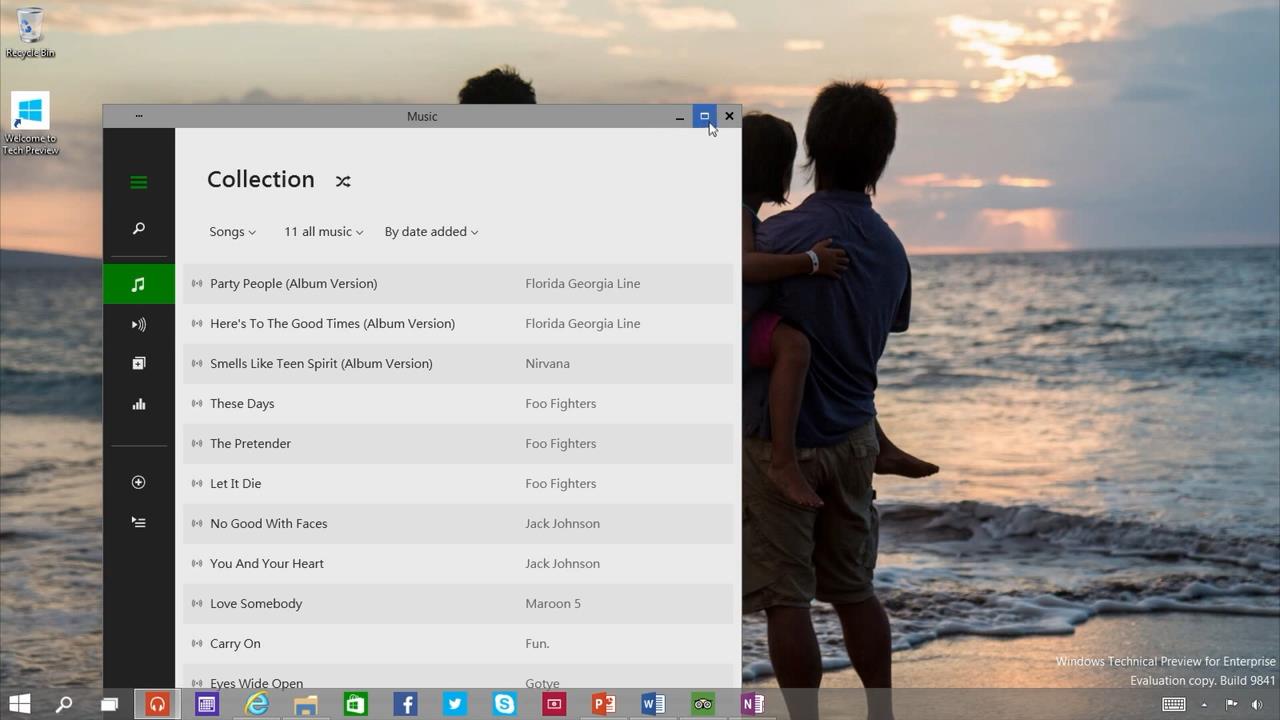
As seen in the leak, you can now use the Windows Store and other full-screen only apps in windowed mode, unlike how in Windows 8 they were always full screen and you could not use them in windowed mode. You can also 'snap' them to sides now, and have full freedom with moving them around, resizing them and so on.
One of the major features revealed in the announcement, and according to the Vice President of Windows, Joe Belfiore, also the thing the Windows team is looking forward to getting a lot of feedback about, is the multi-tasking. The multi-tasking includes many things, such as the multi-desktops we already saw in the leaks, a new 'task view' button, and upgrades to the 'snap' feature.
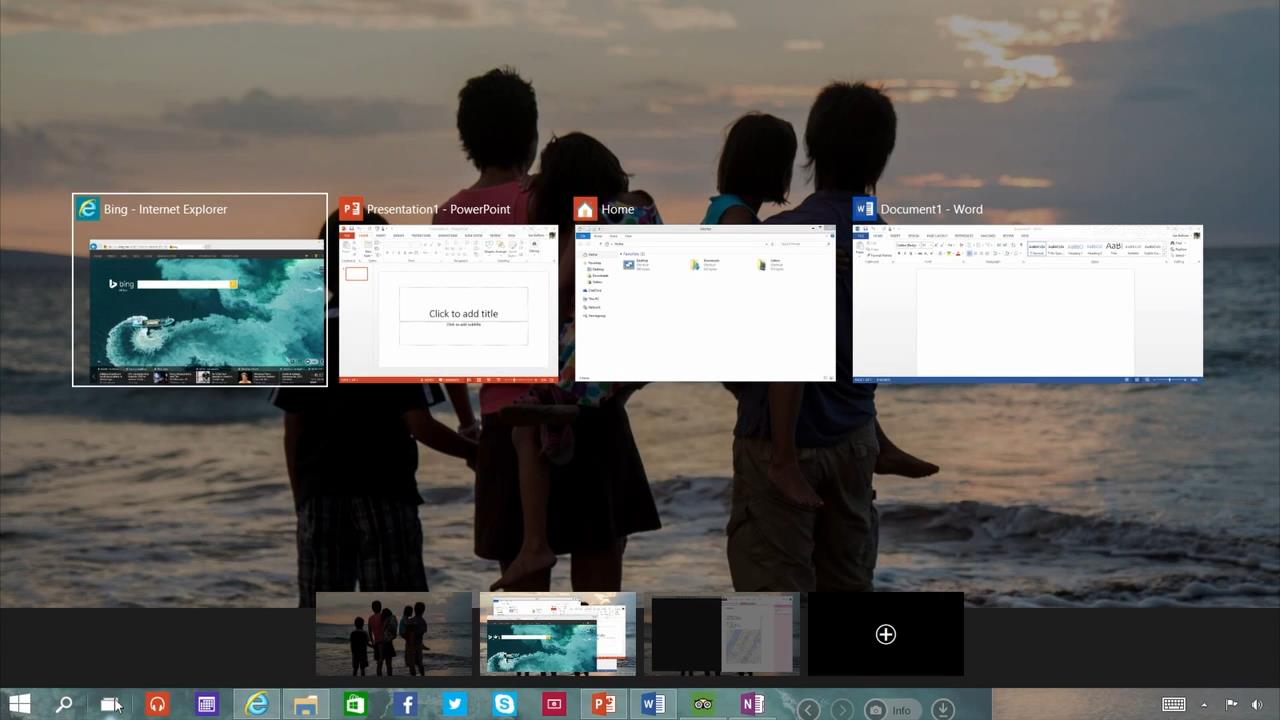
First off, the new 'task view' button. This is basically a feature we have already seen before in Windows, but this time, it's added onto the task-bar so you can easily access it anytime and view and switch through all open apps. It also lets you switch between your multi-desktops(see below).


Last but definitely not the least, the all new multi-desktop feature of Windows 10. This feature allows you to set-up different 'desktops' at once, and giving you quick and easy desktop switching, using the task view button(see above). You can now set up multiple desktops, having a different set of applications on each, to keep your computer better organized. A great example is that you can separate desktops into one which you can do your work on, while the other you can use for entertainment and other things. But of course, the use of this differs from person to person.
You can download the Technical Preview of Windows 10 and sign up for the 'Windows Insider Program', through which you can test the preview of Windows 10 and through the Windows Insider Program, give feedback on forming Windows 10 into what the users want, as the feedback will go directly to the Windows team, and Microsoft hopes that this will help them create the "best Windows yet". Although unfinished and unpolished, the Windows 10 Technical Preview will keep getting updated for several months and will require feedback for the updates all the way to the final product.
You can download the Windows 10 preview and sign up for the Insider Program from this link ---->
http://preview.windows.com
To learn more about the 'Windows Insider Program' and the Technical Preview from the Vice President of Windows himself, Joe Belfiore, watch the video released just recently from Microsoft:
Windows 10's retail version comes out in 2015, however, the pricing and exact release date is not revealed yet.
Leave your comments, opinions, feedback and issues in the comments section below!
While everyone was expecting a Windows 9, Microsoft jumped straight to Windows 10. The project 'Threshold', and the 'Windows 9' leaks that surfaced around a bit earlier, are actually Windows 10, as revealed today, and there will be no Windows 9 at all.
Microsoft is calling Windows 10 the 'best Windows yet', and will be integrating extreme feedback this time around, all the way up to the release.
The all-new 'start menu'.
The Windows 10 reveal shows a new start menu, which is basically a merging of both Windows 7 and Windows 8 start menus. While having a Windows 7-like start menu on the left side, the right side consists of Live Tiles from Windows 8, basically giving both the users who want the old start menu back, and those who liked the live tiles what they like into one thing.
The 'start menu' search.
The start-menu search also has a Windows 8 twist to it, as it will not only bring up things from your PC, but also the internet. It will also be in the task-bar as well, not only the start menu.
As seen in the leak, you can now use the Windows Store and other full-screen only apps in windowed mode, unlike how in Windows 8 they were always full screen and you could not use them in windowed mode. You can also 'snap' them to sides now, and have full freedom with moving them around, resizing them and so on.
One of the major features revealed in the announcement, and according to the Vice President of Windows, Joe Belfiore, also the thing the Windows team is looking forward to getting a lot of feedback about, is the multi-tasking. The multi-tasking includes many things, such as the multi-desktops we already saw in the leaks, a new 'task view' button, and upgrades to the 'snap' feature.
The new 'task view' button.
First off, the new 'task view' button. This is basically a feature we have already seen before in Windows, but this time, it's added onto the task-bar so you can easily access it anytime and view and switch through all open apps. It also lets you switch between your multi-desktops(see below).
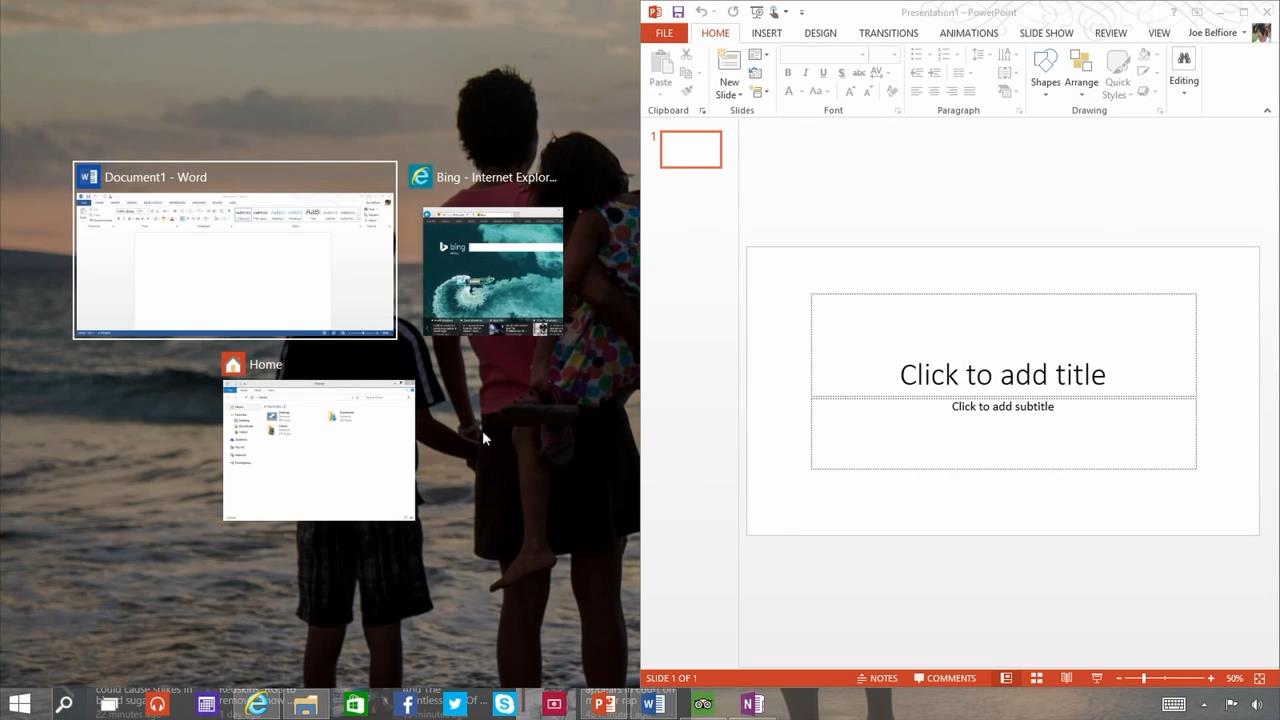
The new 'snap suggestion' feature.
Next up, are the 'snap' feature updates. One of the updates(seen above), is the 'snap suggestion' update, which is basically, if you 'snap' one application on the screen, Windows will automatically suggest other open apps to the user to 'snap' on the remaining space on your display.
Up-to 4 applications can be snapped at the same time now.
You can now 'snap' up to 4 applications at the same time on your display now, as seen in the picture above, changing the traditional 2-applications-per-display we currently have.
The all-new multi-desktops.
Last but definitely not the least, the all new multi-desktop feature of Windows 10. This feature allows you to set-up different 'desktops' at once, and giving you quick and easy desktop switching, using the task view button(see above). You can now set up multiple desktops, having a different set of applications on each, to keep your computer better organized. A great example is that you can separate desktops into one which you can do your work on, while the other you can use for entertainment and other things. But of course, the use of this differs from person to person.
You can download the Technical Preview of Windows 10 and sign up for the 'Windows Insider Program', through which you can test the preview of Windows 10 and through the Windows Insider Program, give feedback on forming Windows 10 into what the users want, as the feedback will go directly to the Windows team, and Microsoft hopes that this will help them create the "best Windows yet". Although unfinished and unpolished, the Windows 10 Technical Preview will keep getting updated for several months and will require feedback for the updates all the way to the final product.
You can download the Windows 10 preview and sign up for the Insider Program from this link ---->
http://preview.windows.com
To learn more about the 'Windows Insider Program' and the Technical Preview from the Vice President of Windows himself, Joe Belfiore, watch the video released just recently from Microsoft:
Windows 10's retail version comes out in 2015, however, the pricing and exact release date is not revealed yet.
Leave your comments, opinions, feedback and issues in the comments section below!