Bookmark This
  • Our Gaming Emulators GuideGAMING
  • Why I Believe That Video Game Piracy Is A Good ThingOPINION
  • Cake CrumbsPEOPLE
  • Beggars of The InternetSOCIAL MEDIA
Our Gaming Emulators Guide1 Why I Believe That Video Game Piracy Is A Good Thing2 Cake Crumbs3 Beggars of The Internet4
http://wowslider.com/ by WOWSlider.com v8.5

CEO of Nintendo of America, Satoru Iwata, Has Died At The Age of 55

with


Nintendo has announced that Satoru Iwata, the legendary CEO of Nintendo, has passed away at the age of 55. The cause of death has been stated to be a growth in his bile duct.

Satoru Iwata had joined the video gaming industry at a young age, firstly working for Hal Laboratory, where he had helped developed games like Kirby.

He joined Nintendo in 2000, and had become the president of the company in 2002, and in 2013 he had announced that he was appointed as the CEO of Nintendo of America.

At Nintendo he helped create games like Mario, Legend of Zelda and Animal Crossing. He directed the company in the development of the Nintendo Wii consoles and Nintendo DS, which were extremely beneficial to the company.

In 2014 he had announced that he would cut his salary in half to help the company deal with the financial loss it had been experiencing, due to the poor sales of the Wii U.

Following the death of Satoru Iwata, the company will be ran by Shigeru Miyamoto and Genyo Takeda until another CEO is appointed.

This is indeed a saddening moment for the gaming industry and gamers from all over the world are paying him a tribute.

One of the most famous quotes of Satoru Iwata was in his 2005 GDC Keynote speech:
On my business card, I am a corporate president. In my mind, I am a game developer. But in my heart, I am a gamer.
READ THIS
Published On Entertainment Ghost At Monday, July 13, 2015

Microsoft Has Confirmed That Pirated Users Will NOT Get A Free Genuine Windows 10 Upgrade

with


Earlier, about everyone believed Microsoft meant that they will be offering a free genuine upgrade to Windows 10 within the first year not only to genuine users, but even pirated(non-genuine) users.

However, Microsoft has clarified that their statement was misinterpreted. Microsoft representatives have indicated that the users that have pirated copies of Windows 7 and 8 will be able to upgrade to Windows 10 but the version they will get will be considered 'unofficial', which means the update will be non-genuine, just like their previous version of Windows was. Microsoft has stated:

With Windows 10, although non-genuine PCs may be able to upgrade to Windows 10, the upgrade will not change the genuine state of the license ... If a device was considered non-genuine or mislicensed prior to the upgrade, that device will continue to be considered non-genuine or mislicensed after the upgrade.

Microsoft has not yet revealed what the difference between the genuine and non-genuine versions of Windows 10 will be, but people are speculating the non-genuine version might be a 'lite' version of the operating system, or will have restrictions in features, or a ban from the Windows Store and such.
READ THIS
Published On Entertainment Ghost At Friday, March 20, 2015

Microsoft Will Be Offering Free Upgrades To Windows 10 Even For Users With Pirated Copies of Windows 7 and 8

with
Microsoft is offering free upgrades to Windows 10 even for users with pirated copies of Windows 7 and 8


According to a report, Microsoft is going to upgrade not only genuine copies of Windows 7 and 8 to Windows 10 for free, but also pirated ones.

The head of Microsoft's operating systems unit, Terry Myerson, has stated while in China this week that:
We are upgrading all qualified PCs, genuine and non-genuine, to Windows 10.

Since it was said in China, it caused confusion which made people think that the free Windows 10 upgrade could be limited to China, however, Microsoft has since confirmed that it is not limited to China and anyone around the world with a device that can handle Windows 10, will receive the free upgrade.

The reason for this decision is to fight rampant piracy of the Windows operating system, stating:
We believe customers over time will realize the value of properly licensing Windows and we will make it easy for them to move to legitimate copies.

Windows 10 is expected to be released this Summer, and is said to have more features being added after release. Those using Windows 7 and 8 will be offered a free upgrade to Windows 10 in the first year of it's release.

Are you excited for Windows 10, or plan to stick to your current operating system? Leave your comments, opinions, feedback and issues in the comments section below!
READ THIS
Published On Entertainment Ghost At Wednesday, March 18, 2015

WhatsApp Officially Launches Web Version - Here's How To Get And Use It

with
WhatsApp has officially launched a web version of the popular cross-platform messenger. This means that you can now use the WhatsApp messenger right in your browser by syncing your phone's app with the browser.

Every WhatsApp app on the Android, Windows Phone, BlackBerry, BlackBerry 10, and Nokia S60 devices has received a new update that adds a QR Code scanner in it. This feature is not yet available for iOS devices, which means iOS users are not yet able to use WhatsApp on their browsers.

The use of the QR Code is for syncing your WhatsApp with the web browser version, by scanning the code provided by it through your phone.

Here is a step-by-step guide to use WhatsApp in your browser:


An updated WhatsApp menu for mobile devices.

The first thing is that your WhatsApp should be updated on your mobile. If it's not updated already, make sure to update it now.


Then open https://web.whatsapp.com and scan the QR Code on the site(picture below) with your WhatsApp Mobile app on your phone.


The log-in page of the web version of WhatsApp


Scanning the QR Code on your WhatsApp Mobile app looks like this. To use the WhatsApp web version, your phone must be connected to the internet.


If your phone is offline(not connected to the internet), you will see this message on the web version of WhatsApp. You can only use the web version if your WhatsApp Mobile app is active and connected to the internet. 


WhatsApp's web version will continue trying to connect to your phone. 


An example of the WhatsApp web version's chat window, displaying attachments, voice, and emoticons.


Here is what you can do with the web version of the WhatsApp:

  • Chat with your contacts
  • Use emoticons and smileys 
  • Voice Recording 
  • Attachment sending
  • Video recording from webcam
  • View your profile and status 
  • View contact info
  • Desktop & sound alerts 

You cannot edit your profile, status and contacts on the web version of WhatsApp. You can also log out of the web version of WhatsApp using the Mobile app.

READ THIS
Published On Entertainment Ghost At Thursday, January 22, 2015

AMD Has Clarified That Richard Huddy "Misspoke" About Windows 7 Not Supporting DirectX 12

with


There were many reports stating that Windows 7 will not be supporting DirectX 12, coming from a video of AMD's Chief Gaming Scientist, Richard Huddy at the PDXLAN event. Richard Huddy stated on the event that Windows 7 will not support DirectX 12.

After that, every major news site spread the word and Windows 7 users were greatly disappointed, as well as websites making articles such as "it's time to upgrade your Windows".

However, AMD has clarified that Richard Huddy 'misspoke' about the topic. AMD issued a statement that says:

There have been reports based on a video of Richard Huddy of AMD making speculative comments around DirectX 12 support on versions of Windows. Richard Huddy does not speak for Microsoft, and he was unfortunately speculating from Microsoft’s publication of key dates and milestones for Windows 7 lifecycle and mainstream support policy. Richard has no special insight into Microsoft’s Windows or DirectX roadmaps. Microsoft is a key, strategic partner for AMD and we’re continuously collaborating with them on DirectX 12.
AMD has not stated whether DirectX 12 will be available for Windows 7 or not, but the statement made by Richard Huddy was misspeaking, and they do not have an insight on such things.

DirectX 12 has been said to be a "low level" graphics API and will include many improvements to existing graphics cards, a well as the Xbox One.

PC gamers who do not like Windows 8 are worried about this and are expressing great demand for DirectX 12's availability for Windows 7. 

Microsoft has not made a statement regarding whether DirectX 12 will be supported by Windows 7 or not, but they have confirmed that they are aware of the demand.

Gamers who still use Windows 7 are awaiting an official confirmation from Microsoft on the topic. 
READ THIS
Published On Entertainment Ghost At Sunday, November 16, 2014

Inbox by Gmail

with
Google's all new Inbox by Gmail service

Through a Blog post, Google has announced a new email app. Called the 'Inbox' by Gmail, Inbox is a separate app developed by the team of Gmail.

Inbox is said to be in development for years by the Gmail team, but it was never meant to be an update, and was always meant to be a separate app.

Google announces Inbox by Gmail


The Inbox app introduces a new way to keep track of your emails, and helps you sort out between important emails and the spam, and also helps you out by highlighting the most important emails to you, and sorting emails out to help you keep it all organized and easy, basically expanding on the 'tabs' we see in Gmail.

The Inbox introduces new ways to get your email, which are a nice change to what we see in Gmail for years. 

Here are the new features that Inbox brings with it:

Bundles: 
The 'Bundles' basically expands on the 'tabs' we've seen in Gmail. Introducing better categorization and organizing, it helps you by making it easy to deal with similar emails of one type at once. An example given, all your purchase receipts or bank statements will be neatly grouped together, allowing you to quickly review them and simply swipe them out of the way. 

You can even teach Inbox your own method, by choosing which emails you would like to see grouped together, helping you bring in more organization to it.


Highlights: 
The Inbox app highlights the key information from your messages that it finds important, such as flight itineraries, event information, photos and documents emailed to you by friends and family(which makes it important). The app will display useful information that it will gather from the web that wasn't even in the original email, such as real-time status of your flights and package deliveries.

Highlights and Bundles have a close relationship, as they both work together to give you a quick glance at the information the app feels you need.


Reminders, Assists, and Snooze: 
Dubbed 'your to-do’s on your own terms', the 'Reminders, Assists and Snooze' feature will make it easy to focus on your priorities by letting you add reminders, such as reminders on what to do on your daily basis such as when you need to make an important call or do an important task.

After the 'Reminders' feature, comes the 'Assists'. The Assists will help you make it easier to do the tasks that you put as your reminders. Such as, if you made a reminder to call a hardware store, the Inbox app's Assist feature will supply you the store's phone number, as well as also tell you if it's open or closed, making it easier for your task to be done.

Assists also work for your email. An example given, if you make a restaurant reservation online, the Inbox app will add a map to your confirmation email. If you book a flight online, Inbox will givw you a link to check-in. 

Now enters the 'Snooze'. Snooze lets you snooze away emails and reminders, allowing you to set a time for the reminder or email to come back at you, or even a specific location for it to alert you when you're in the location, such as your home or office, or any other location.


Inbox by Gmail in action


Inbox is only up for invitations currently, and in order to get your invitation for the app, you need to sign up for the first round of invitations that are rolling out. The ones selected will also be able to invite their friends into the service. 

You can get your invitation by sending an email at inbox@google.com, or you can just ask a friend who gets invited in, or wait for the application to get released for everyone. Although it isn't officially said, it is personally recommended by me that you send the invitation email from your Gmail account that you want to link with Inbox.

Gmail will not be getting shut down, and Inbox will introduce a new experience for you, while you can simply just continue your Gmail experience as well.

While you're waiting, check out the official blog post 'here', the official Inbox site 'here', and also watch the official Inbox reveal video below:

READ THIS
Published On Entertainment Ghost At Wednesday, October 22, 2014

Windows 10 Technical Preview: Installation and Hands-On Preview

with
So you want to get your hands on the new Windows 10 Technical Preview, see a hands-on experience, or both? Then you're at the right place! Here, you'll learn how to get your hands on the preview and also see a hands-on experience with it.

If you want to download the Windows 10 Technical Preview, you can get it from here. if you want to try Windows Technical Preview for your company, download enterprise edition version from here.

Before downloading and installing the technical preview, please note that it is not polished and is not completely stable, but it is a rough build with lots of bugs and Microsoft recommends that you install the technical preview on a secondary computer.

We recommend you to be sure to read the Privacy Statements for the Windows 10 Technical Build. Here are some important ones:
  • When you install the Program, we may collect information about your device and applications and use it for purposes such as determining or improving compatibility,
  • When you use voice input features like speech-to-text, we may collect voice information and use it for purposes such as improving speech processing,
  • When you open a file, we may collect information about the file, the application used to open the file, and how long it takes any use it for purposes such as improving performance, or
  • When you enter text, we may collect typed characters and use them for purposes such as improving autocomplete and spellcheck features.

After you have downloaded the Windows 10 Technical Preview ISO, open it with the windows explorer or the program you uses to mount ISO images. Run 'setup.exe' from the drive and your Windows will load the set-up and a  'License terms' screen will appear. Then, the 'Checking For Updates'(see below) screen appears.


Set-up loading in process.

The license terms screen.


The ready to install screen after the set-up successfully loads.


You can now choose to install the preview and whether you want to keep your settings, personal files and applications on your computer.

However, you can change installation type by clicking on "Chose what to keep".


Here you will see three options, If you chose the option 'Nothing', Windows will format your Drive C or the partition in which you have the previous OS installed. If you choose 'Keep personal files only', your files will be safe, but your settings and applications will be removed. If you select "Keep Windows settings, personal files, and apps", you will keep all of your files, settings and applications.

Once you've selected the options of your choice, click the 'Install' button and the installation begins.


Windows 10 Technical Preview being installed.


The installation screen warning the user about the computer being restarted.


The installation reboots the computer and after it comes back, it installs further and after the installation is complete, you see the 'Getting devices ready' screen and then it says 'Getting ready'. After that, you can set the time and date and after that, you get settings similar to Windows 8, such as whether you want to use apps' location or not, and other similar things. Then, you will be asked to either make a Microsoft account or a local account, and then Windows will say 'installing apps' and other similar text, then the computer will finally go inside the Windows.


Desktop on the first boot. Here you will see two new buttons in the task bar. The buttons are 'Search' and 'task view'. You cannot unpin these buttons.


Some applications may not run on the Windows 10 Technical Preview and give you this error. Some anti-viruses do not work on the technical preview, such as avast!. However, many still work such as the AVG anti-virus. Microsoft fixes bugs over time through updates, so there is a possibility that Microsoft might fix these issues through an update as well.


You can resize, uninstall, unpin, and turn-off live preview of the tiles in the Start Menu, by right-clicking them just like in Windows 8.


An example of resizing the tiles.


You can turn remove the tiles from the Start Menu and have a classic Start Menu, however, the search still finds results from both your computer and the internet, which is a Windows 8.1 addition to the search.
You can remove the Bing search by simply going to PC Settings > Search and Apps > Search and turning the metered connection options off.


The Windows 10 Technical Preview's search  comes with the Bing search engine. If you never use Bing search, you may find this feature not rather useless. 


The apps open in the desktop by default. You can make them full screen as opposed to using them on the desktop/windowed, and you can access the applications' options by clicking on the menu from the top of the left side of the application.


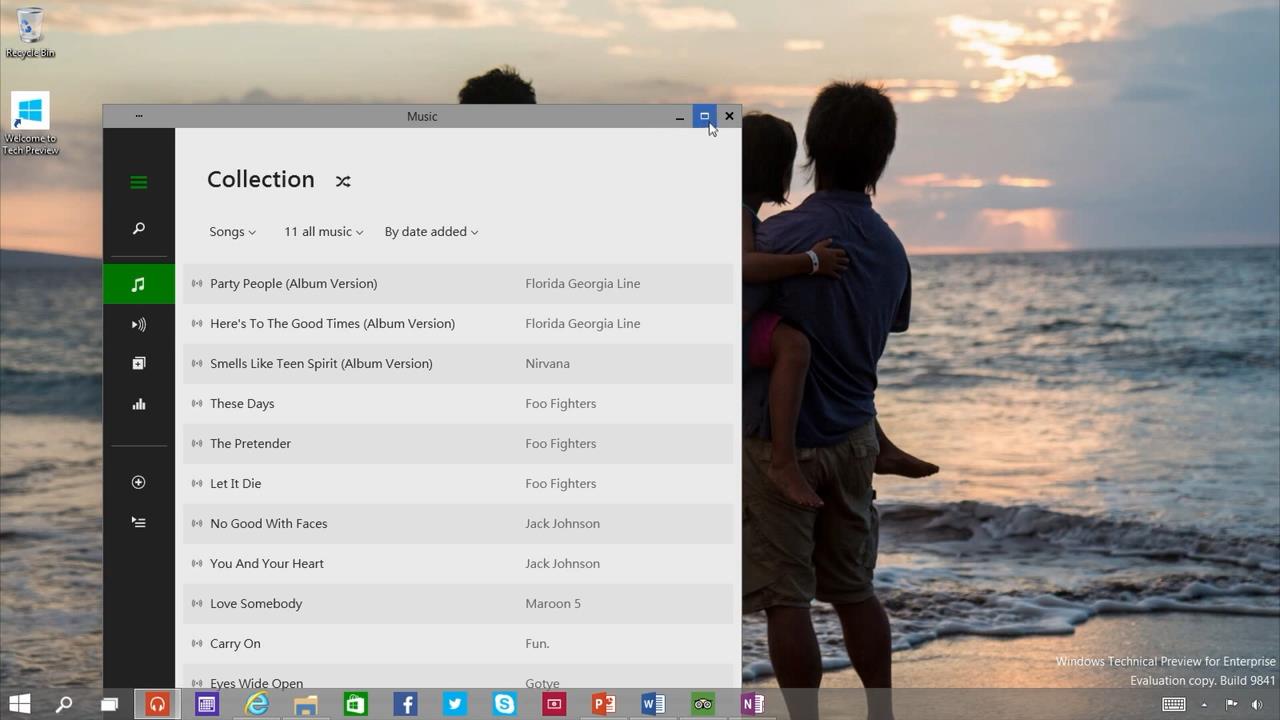
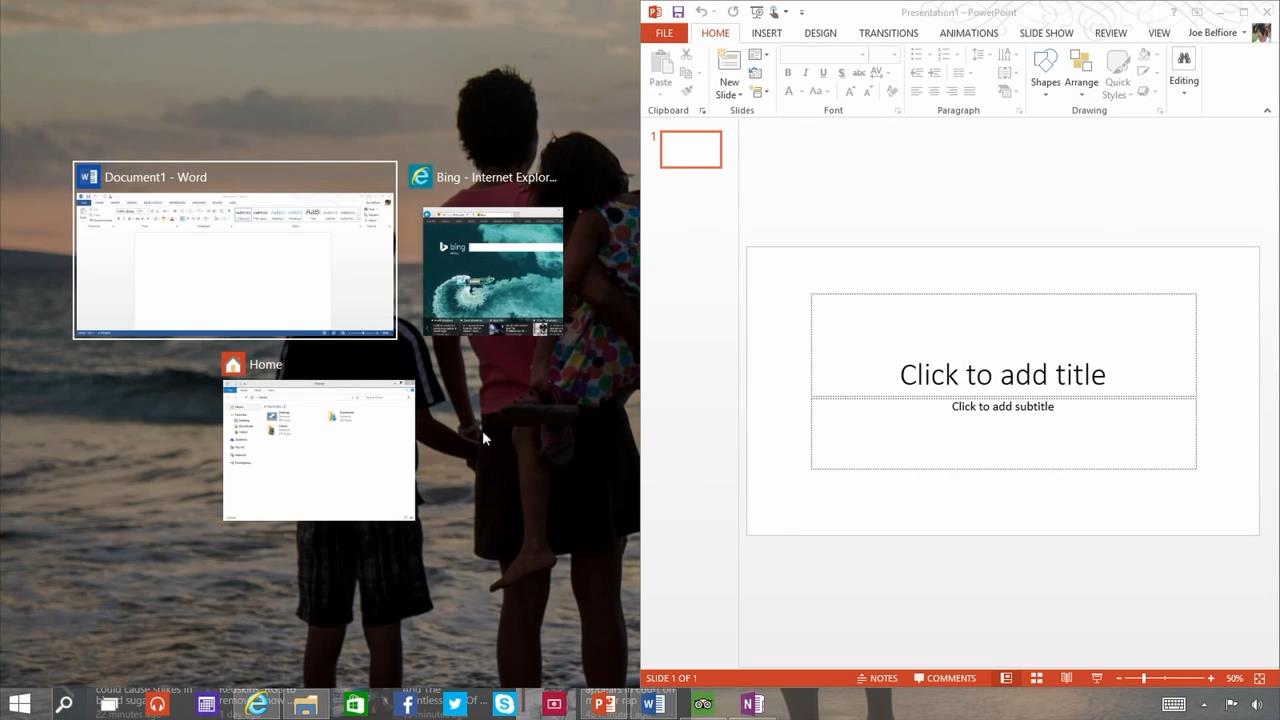
The new Windows 10 Technical Preview snap in action.
You can now 'snap' 4 applications on a screen at the same time in the Windows 10 Technical Preview.


The Taskbar Start Menu Properties in the Windows 10 Technical Preview
The Windows 10 Technical Preview comes with the Start Menu by default. If you prefer the Start Screen instead, you can get it back from the "Taskbar and start menu properties", which you can open by simply right-clicking on the Taskbar, then going to it's 'properties' and then clicking on the 'Start Menu' tab.


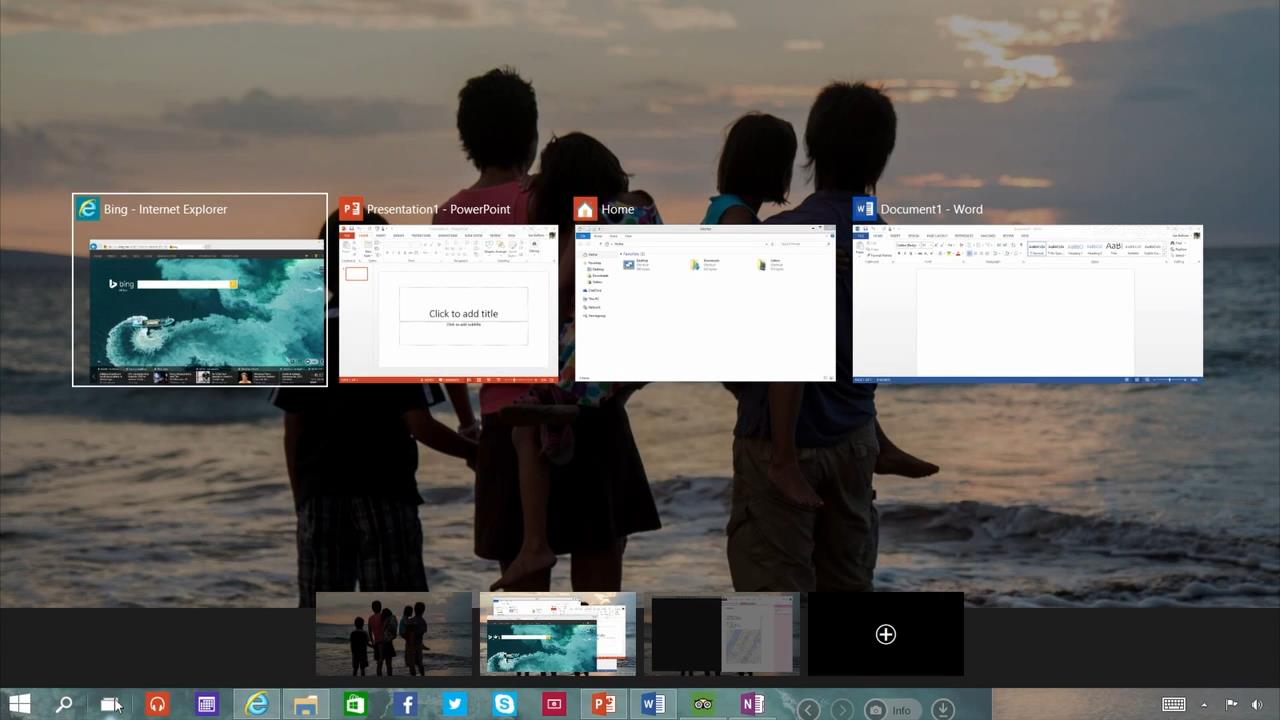
The task view button in action in the Windows 10 Technical Preview.
The 'task view' button in action.

The task view button in action in the Windows 10 Technical Preview.
Unlike the 'virtual desktop' software, which can create new and full desktops, in the Windows 10 Technical Preview, the 'Taskbar' shows each opened application currently opened in other  desktops.


You cannot open the 'Charm Bar' by pointing the mouse on the right corners of the screen anymore, like you could in Windows 8 and 8.1. Instead, you will need to use the Windows' shortcut keys(Window+C) in order to open the Charm Bar.

These are the latest additions to the Windows operating system, and the most important ones. However, this is definitely not the final version of Windows 10, and through feedback and time, Microsoft will be constantly updating the Technical Preview and fixing it's bugs, and possibly, expanding it's application comparability.


Have you joined the Insider Program and tried out the Windows 10 Technical Preview yet, or are you going to wait for a more stable build? Leave your comments, feedback, opinions and issues in the comments section below!
READ THIS
Published On Entertainment Ghost At Saturday, October 04, 2014

Microsoft Reveals Windows 10 And It's Technical Preview: Here's Everything You Need To Know About It

with
Microsoft has officially revealed the next Windows OS, the all new Windows 10.

While everyone was expecting a Windows 9, Microsoft jumped straight to Windows 10. The project 'Threshold', and the 'Windows 9' leaks that surfaced around a bit earlier, are actually Windows 10, as revealed today, and there will be no Windows 9 at all.

Microsoft is calling Windows 10 the 'best Windows yet', and will be integrating extreme feedback this time around, all the way up to the release.


Integrating both Windows 7 and 8 Start Menu into one
The all-new 'start menu'.

The Windows 10 reveal shows a new start menu, which is basically a merging of both Windows 7 and Windows 8 start menus. While having a Windows 7-like start menu on the left side, the right side consists of Live Tiles from Windows 8, basically giving both the users who want the old start menu back, and those who liked the live tiles what they like into one thing.


The upgraded start-menu search in Windows 10.
The 'start menu' search.

The start-menu search also has a Windows 8 twist to it, as it will not only bring up things from your PC, but also the internet. It will also be in the task-bar as well, not only the start menu.


The Windows Store apps in Windowed Mode in Windows 10


As seen in the leak, you can now use the Windows Store and other full-screen only apps in windowed mode, unlike how in Windows 8 they were always full screen and you could not use them in windowed mode. You can also 'snap' them to sides now, and have full freedom with moving them around, resizing them and so on.

One of the major features revealed in the announcement, and according to the Vice President of Windows, Joe Belfiore, also the thing the Windows team is looking forward to getting a lot of feedback about, is the multi-tasking. The multi-tasking includes many things, such as the multi-desktops we already saw in the leaks, a new 'task view' button, and upgrades to the 'snap' feature.


The all-new task view button in Windows 10.
The new 'task view' button.

First off, the new 'task view' button. This is basically a feature we have already seen before in Windows, but this time, it's added onto the task-bar so you can easily access it anytime and view and switch through all open apps. It also lets you switch between your multi-desktops(see below).


The new snap suggestion feature in Windows 10.
The new 'snap suggestion' feature.

Next up, are the 'snap' feature updates. One of the updates(seen above), is the 'snap suggestion' update, which is basically, if you 'snap' one application on the screen, Windows will automatically suggest other open apps to the user to 'snap' on the remaining space on your display.


Windows 10 supports up-to 4 'snapped' applications at the same time on one display.
Up-to 4 applications can be snapped at the same time now.

You can now 'snap' up to 4 applications at the same time on your display now, as seen in the picture above, changing the traditional 2-applications-per-display we currently have.


The all-new multi-desktops of Windows 10.
The all-new multi-desktops.

Last but definitely not the least, the all new multi-desktop feature of Windows 10. This feature allows you to set-up different 'desktops' at once, and giving you quick and easy desktop switching, using the task view button(see above). You can now set up multiple desktops, having a different set of applications on each, to keep your computer better organized. A great example is that you can separate desktops into one which you can do your work on, while the other you can use for entertainment and other things. But of course, the use of this differs from person to person.


You can download the Technical Preview of Windows 10 and sign up for the 'Windows Insider Program', through which you can test the preview of Windows 10 and through the Windows Insider Program, give feedback on forming Windows 10 into what the users want, as the feedback will go directly to the Windows team, and Microsoft hopes that this will help them create the "best Windows yet". Although unfinished and unpolished, the Windows 10 Technical Preview will keep getting updated for several months and will require feedback for the updates all the way to the final product.

You can download the Windows 10 preview and sign up for the Insider Program from this link ---->
http://preview.windows.com

To learn more about the 'Windows Insider Program' and the Technical Preview from the Vice President of Windows himself, Joe Belfiore, watch the video released just recently from Microsoft:


Windows 10's retail version comes out in 2015, however, the pricing and exact release date is not revealed yet.

Leave your comments, opinions, feedback and issues in the comments section below!
READ THIS
Published On Entertainment Ghost At Tuesday, September 30, 2014

Videos and Pictures of Windows 9 Have Been Leaked, Showing New Features and More!

with
Source: YouTube.com

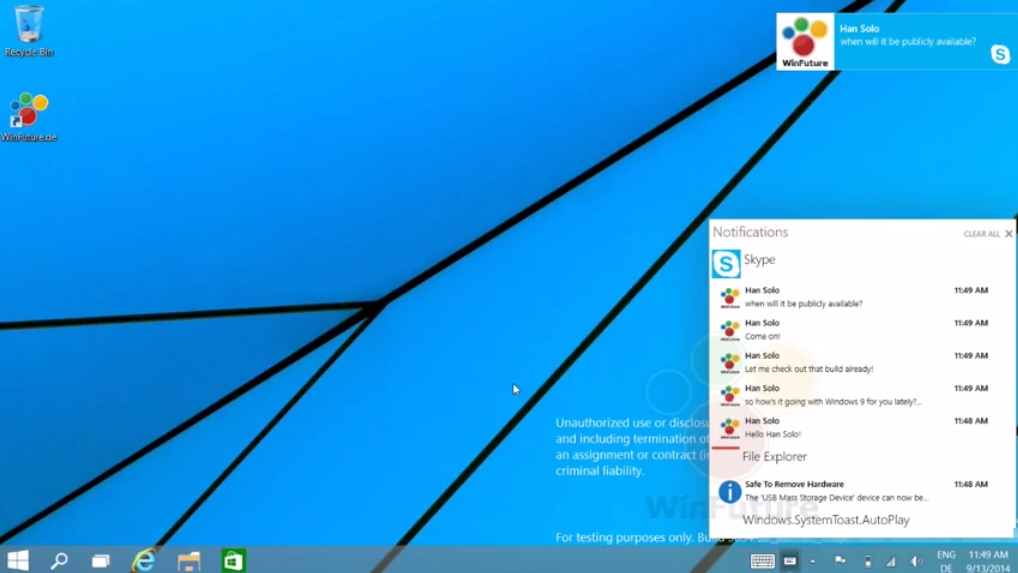
With the 'Technical Preview' set to appear either later this month or shortly afterwards, pictures and videos of Windows 9 have leaked around the internet just recently, and display several new features such as multi-desktop, the return of the start menu, and the ability to run apps such as the store in windowed mode and a new notifications bar(see above).


A picture of the Multi-Desktop

The multi-desktop feature appears to let the users switch between multiple sets of the desktop, allowing users to have more than one desktop in use at a time and manage through different set-ups, such as having different sets of apps open in each desktop, kind of like the "Workspaces" seen in Ubuntu Linux.


The Multi-Desktop in action.


The new notifications bar(see first picture) appears to give you notifications from the Windows Store apps, but it might have more to it than what it just appears to be currently.


Another screenshot from Windows 9

Unfortunately, the leaks do not show any major changes or new features(if there are any), but we do see the return of the fan beloved start menu and the multi-desktop, which appears to be a great addition and would help avoiding crowded tabs and taskbar. It cannot be said whether the notifications are a good addition or not, and users are giving mixed response towards it.

You can watch the Multi-Desktop and the notification bar in action in these videos leaked by WinFuture, below!


The Multi-Desktop in action:


The Notification Bar in Action:


Do you like the new features or are they a let down? Leave your comments, suggestions, feedback and issues in the comments section below!
READ THIS
Published On Entertainment Ghost At Sunday, September 14, 2014

Entertainment Ghost's Friday News Bits! 11-04-2014

with

It's Friday! And here are the Friday News Bits of this week!


Mother and Son Commit Suicide After Having An Argument Over League of Legends


In China, a 16 year old boy from Guangyuan in the Sichuan province headed straight to a local gaming cafe after school. The boy was an avid player of League of Legends. He did not return home by the evening, which worried his mother and she started searching every gaming cafe she could find and eventually found him. A loud argument broke out between the boy and his mother, in which his mother stated that:
You go online and I can’t control you, so I’ll just go die!

The mother then dragged her son to the banks of the nearby Jialing river and called her husband to tell him that she was going to kill herself. She walked out into the river and was quickly caught by the current, getting dragged under, with her son's attempts to save her in vain.

Then the father arrived and scolded and kicked his son. The son also plunged into the river himself, like his mother did. The father cried out and stated:
I also don’t want to live, I will go with you

But he was saved by cops before he could suicide like his wife and son did.

The mother and the son haven't been seen since and have been presumed dead. It is unknown what exactly led them to suicide, but it began with an argument over League of Legends. Although this is absolutely nothing to blame video games for, this will not stop the anti-gaming community to blame it on video games.


The Ultimate Warrior Dies At The Age of 54


Iconic and legendary WWE wrestler, the Ultimate Warrior, has passed away at the age of 54.

Days before his death, he had appeared on the "Monday Night RAW" event of WWE, where he gave a speech that people believe to have foreshadowed his own death. His speech was:
No WWE talent becomes a legend on their own. Every man's heart one day beats its final beat; his lungs breathe their final breath. And if what that man did in his life makes the blood pulse through the body of others and makes them believe deeper in something larger than life, then his essence, his spirit will be immortalized by the storytellers, by the loyalty, by the memory. You are the legend-makers of Ultimate Warrior.

Mr. Hellwig, who had legally changed his name to Warrior and went by the ring-name Ultimate Warrior, was one of the most influential and popular WWE stars of his career days. His career was 15 years long, spanning from 1985 to 98, with his most memorable years in the career being from 1987 to 91. His victory against Hulk Hogan on the Wrestlemania VI, becoming the WWE Champion is one of the most memorable matches in the history of Pro Wrestling.

WWE announced his death in a statement, with no cause of death revealed. The statement was:
WWE is shocked and deeply saddened to learn of the passing of one of the most iconic WWE Superstars ever, The Ultimate Warrior. Warrior began his WWE career in 1987 and quickly went on to become one of the biggest stars in WWE history. Warrior became WWE Champion at WrestleMania VI, defeating Hulk Hogan in an epic encounter. We are grateful that just days ago, Warrior had the opportunity to take his rightful place in the WWE Hall of Fame and was also able to appear at WrestleMania 30 and Monday Night Raw to address his legions of fans. WWE sends its sincere condolences to Warrior’s family, friends and fans. Warrior was 54 and is survived by his wife Dana and his two daughters.

The Ultimate Warrior had recently been added into the Hall of Fame. After his death, many WWE personalities paid their condolences, such as Paul Heyman, Tripple H, Hulk Hogan, Jake "The Snake" Roberts, Chris Jericho, and others. Fans are also very saddened by his loss and have mourned his death.


Woman Attempted To Be Robbed While Talking About The Crime Rate on Live TV in Brazil


A Brazillian woman nearly got robbed on live TV in Rio de Janeiro, Brazil.

The woman, ironically, was giving an interview about the high crime rate and the lack of police in the area, when a thief appeared out of nowhere and attempted to snatch the woman's gold necklace.

However, as he grabbed it and tried to pull it off, it broke and fell, leaving him empty handed as he ran across the road in the on-coming traffic, while a member of the camera crew of the RJTV news-channel who were interviewing the woman tried to give him chase but failed due to the thief's high speed.


Samsung Galaxy S5 and New Gear Devices Are Ready To Hit The Market


Samsung has officially announced that the Samsung Galaxy S5 and several new Samsung Gear devices: Samsung Gear 2, Samsung Gear 2 Neo, and Samsung Gear Fit are ready to be available in 125 countries in Europe, Middle East, North America, Latin America, and most of Asia!

The CEO & President of IT & Mobile Communications Divisions at Samsung Electronics, JK Shin, has stated that:
The refined design and technological innovation of our new Galaxy S5 and Samsung Gear devices are the direct result of Samsung listening carefully to what consumers wanted in the next generation of mobile technology. We carefully crafted each device to offer a sophisticated, superior mobile experience that let consumers stay connected in their own way to focus on what really matters to them.

The Samsung Galaxy S5 is said to combine the "advanced camera" with "world's fastest auto focus", superior network connectivity and dedicated fitness tools, along with enhanced device protection features which includes IP67 and water resistance.

The Samsung Gear 2 and Gear 2 Neo are said to have "taken wearable technology to the next level", with integrated fitness applications, a music player, remote control feature and "compatibility with a wide variety of Samsung devices". Both offer a slim and lightweight design in a 10 mm thickness.

The Samsung Gear Fit is said to be the "perfect blend of style, fitness and convenience" for a wearable device "like no other". The device has a Super AMOLED display, and real time fitness coaching that provides the user with personalized advice and workout recommendations.


Facebook Is Removing Messaging From The iOS and Android App, Forcing Users To Use The Messenger


Facebook is removing the messaging feature from it's iOS and Android app, forcing users to use the Messenger app for messaging/chating with their Facebook friends. In certain European countries, users are already starting to see notifications that over the next few weeks they will have to install the Messenger app in order to continue sending and receiving Facebook messages on their smartphones.

A Facebook spokesperson told TheNextWeb that the company has found that the users get 20% faster replies on the Messenger app than on the normal Facebook app. He added that:
We have built a fast and reliable messaging experience through Messenger and now it makes sense for us to focus all our energy and resources on that experience. From this week onwards, more people will be notified of the change. Facebook will be removing the messaging feature from its Android and iOS apps in "a handful of countries" over the next couple of weeks. People will have several notices before this change takes place and will have opportunities to learn more about Messenger and its features.

According to TheNextWeb, the change wont affect low-end Android devices with memory constraints, which would allow them to chat with the normal Facebook app without having to download the Messenger app. The iPad Facebook app will also keep the messaging feature as well. Whether people accept the idea of having two Facebook apps for the full usage, is yet to be seen.


Woman Throws A Shoe At Hillary Clinton During Her Speech In Las Vegas

Photo Credit: eOnline

During her speech in Las Vegas on a stage, a woman threw a shoe at Hillary Clinton.

Hillary Clinton ducked and dodged the shoe, and then joked about it saying:
Is that somebody throwing something at me? Is that part of Cirque de Soleil?

People in the audience laughed and applauded at Hillary Clinton's joke and she continued saying:
My goodness, I didn't know that solid waste management was so controversial. Thank goodness she didn't play softball like I did.

After the woman threw the shoe, she was quickly arrested. She admitted to throwing the shoe, however, did not tell why she did it. U.S. Secret Service supervisory special agent Brian Spellacy said the woman was being questioned and would face criminal charges. According to FoxNews, an attendee handed a piece of paper to a reporter that was apparently thrown by the woman, which was a copy of a Department of Defense document labelled confidential and dated August 1967, referring to an operation "Cynthia" in Bolivia.

The incident is similar to what happened in December 2008 in a news conference in Baghdad, when two shoes were thrown at former President George W. Bush, both which he dodged.
READ THIS
Published On Entertainment Ghost At Saturday, April 12, 2014